Usage
Options
These are the options that can be added to the pytest.ini file.
extras_screenshots
The screenshots to add in the report.
Accepted values:
all: Include all gathered screenshots in the report.last: Include only the last screenshot of each test in the report. Works only if the API has been previously called during the test execution in order to store the reference of the WebDriver (Selenium) or Page (Playwright) object.
Default value: all
extras_sources
Whether to include gathered webpage sources in the report.
Default value: False
extras_description_tag
The HTML tag for the test description (test docstring).
Accepted values: h1, h2, h3, p or pre
Default value: pre
API
The function scoped fixture report provides the following methods:
To add a step to the report:
step(
    comment: str = None,
    target: WebDriver|WebElement|Page|Locator = None,
    code_block: CodeBlockText = None,
    full_page: bool = True,
    page_source: bool = False,  # Whether to include the webpage HTML source.
    escape_html: bool = False   # Whether to escape HTML characters in the comment.
)
Auxiliary method to get the code block format of a string:
format_code_block(text: str) -> CodeBlockText
Auxiliary methods to format XML, JSON and YAML strings and files:
format_json_file(filepath: string, indent: int = 4) -> CodeBlockText
format_json_str(text: string, indent: int = 4) -> CodeBlockText
format_xml_file(filepath: string, indent: int = 4) -> CodeBlockText
format_xml_str(text: string, indent: int = 4) -> CodeBlockText
format_yaml_file(filepath: string, indent: int = 4) -> CodeBlockText
format_yaml_str(text: string, indent: int = 4) -> CodeBlockText
Limitations
No support for any kind of parallel tests execution (multi-treads, multi-tabs or multi-windows).
For Playwright, only
sync_apiis supported.
Example
When using the pytest-html plugin (with the --html option), an external CSS file needs be provided with the --css option.
Command-line invocation
If using pytest-html report:
pytest --html=/path/to/report --css=/path/to/css
If using Allure report:
pytest --alluredir=/path/to/allure-results
If using both reports:
pytest --html=/path/to/report --css=/path/to/css --alluredir=/path/to/allure-results
Sample pytest.ini file
extras_description_tag = pre
extras_screenshots = all
extras_sources = False
Sample code
Example using Selenium
def test_with_selenium(report):
    """
    This is a test using Selenium
    """
    driver = WebDriver()
    driver.get("https://www.selenium.dev/selenium/web/web-form.html")
    report.step("Get the webpage to test", driver)
    driver.find_element(By.ID, "my-text-id").send_keys("Hello World!")
    report.step("<h1>Set input text</h1>", driver, full_page=True, escape_html=False)
    driver.find_element(By.NAME, "my-password").send_keys("password")
    report.step(comment="Another comment", target=driver)
    report.step("Comment without screenshot")
    report.step(comment="Comment without screenshot")
    driver.quit()
Example using Playwright
def test_with_playwright(page: Page, report):
    """
    This is a test using Playwright
    """
    page.goto("https://www.selenium.dev/selenium/web/web-form.html")
    report.step("Get the webpage to test", page)
    report.step(comment="Get the webpage to test", target=page, full_page=False)
Example adding code-block content
def test_code_block(page: Page, report):
    """
    This is a test with code-block content
    """
    xml = """
        <note>
        <to>John</to>
        <from>Diana</from>
        <heading>Reminder</heading>
        <body>Don't forget me this weekend!</body>
        </note>"""
    report.step("This is a XML document:" + str(report.format_xml_str(xml)))
    report.step(comment="This is a XML document:" + str(report.format_xml_str(xml)))
    report.step("This is a XML document:", code_block=report.format_xml_str(xml))
    report.step(comment="This is a XML document:", code_block=report.format_xml_str(xml))
Example adding code-block content (using Allure report)
def test_code_block(page: Page, report):
    """
    This is a test with code-block content
    """
    xml = """
        <note>
        <to>John</to>
        <from>Diana</from>
        <heading>Reminder</heading>
        <body>Don't forget me this weekend!</body>
        </note>"""
    report.step("This is a XML document:", code_block=report.format_xml_str(xml))
* Always pass the code-block text through the code_block parameter when using Allure.
Sample CSS file
 .logwrapper {
     max-height: 100px;
 }

 .extras_td {
     width: 320px;
     /* text-align: center; */
 }

 .extras_td_div {
     text-align: center;
 }

 .extras_separator {
     height:2px;
     background-color: gray;
     /* display: none; */
 }

.extras_description {
   color: black;
   font-size: larger
 }

 .extras_exception {
     color: red;
 }

 .extras_comment {
     font-family: monospace;
     color: blue;
 }

 .extras_pre {
     margin-left: 30px;
     color: black;
 }

 .extras_failure {
     font-family: monospace;
     color: red;
 }

 .extras_skip {
     font-family: monospace;
     color: orange;
 }

 .extras_image {
     border: 1px solid black;
     width: 300px;
     height: 170px;
     object-fit: cover;
     object-position: top;
 }

 .extras_page_src {
     font-size: 12px;
     color: #999;
 }
Sample reports
Pytest-html sample report
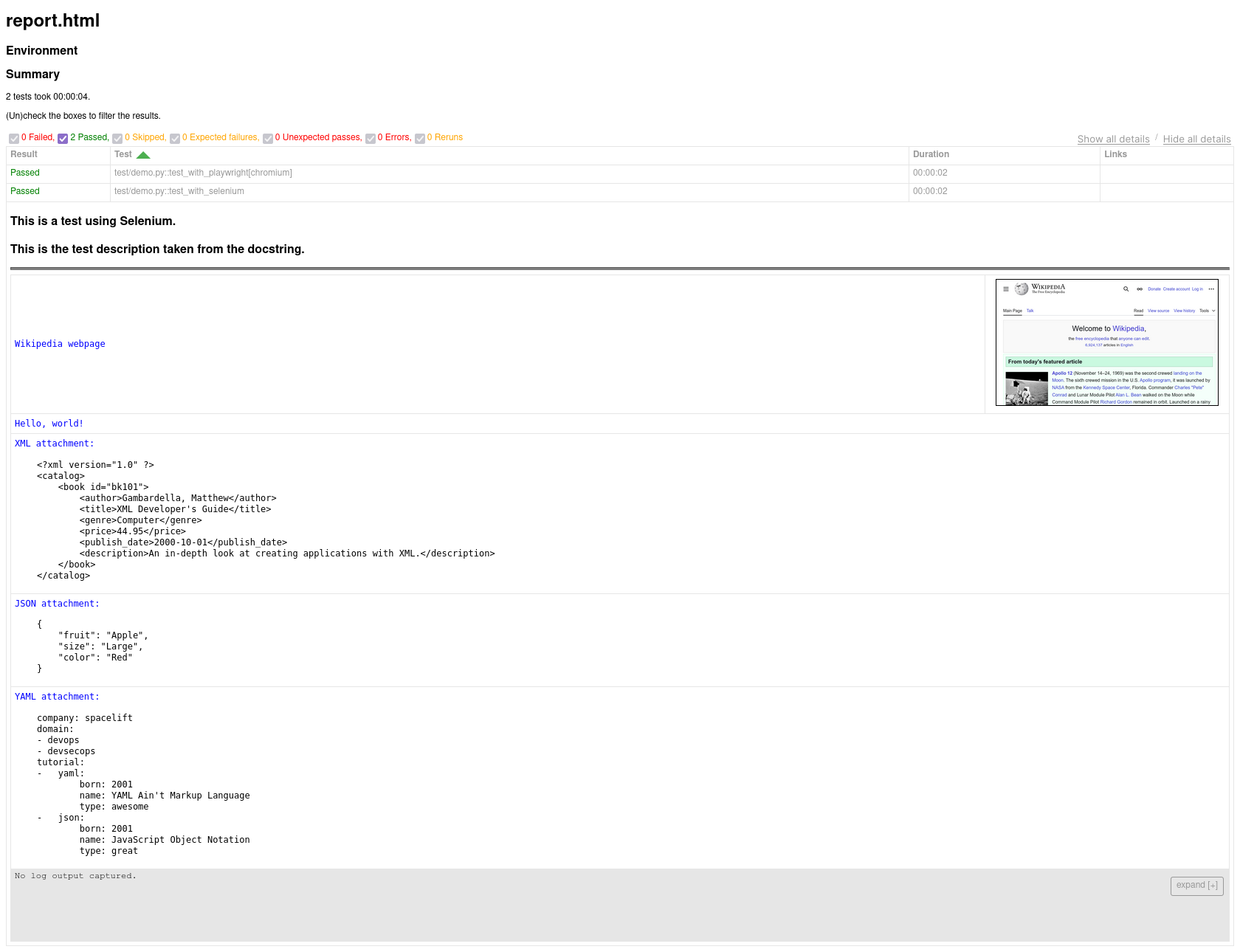
Allure sample report